

Description
Features :
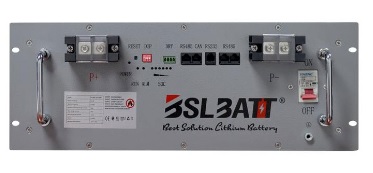
- Model : BSL B-LFP48-135E .
- Mounting : Rack mount type battery .
- >6000 cycles@80% D.O.D
- Battery voltage : 51.2V V DC .
- Designed for residential , commercial / industrial OFF GRID /UPS power systems .
- Superior product lifespan > 15 years.
- 10 year product warranty .
- Parallel capability of 30 batteries = 210 kWh of OFF GRID STORAGE CAPACITY .
- Battery Capacity : 7 kWh
- Maximum charge current @ 50A DC
- Maximum discharge current @105A DC
- BMS battery to inverter comms via CAN or RS485 protocol .
- Download datasheet here : B-LFP48-135E
- Download user manual here : BSL_BATT_RACK_MOUNT_SOLAR_BATTERY_USER_MANUAL
- Warning ! ” Your LifePo4 lithium batteries and inverters you buy from us must be the ones we have specified that are compatible with each other .This keeps your warranties intact and also they are designed to work with each other , so please only use our compatible inverters that work with your battery/ ies listed below .” ( Davit Ben Yisrael – Director : Genesis Power Systems Pty Ltd ) .
Our compatible inverters we sell for this battery :
- Luxpower , Growatt , Deye , Victron , Voltronic , Axpert , RCT
- Warning ! ” Make sure you receive the correct battery to inverter BMS network cable that goes between your inverter and battery from our manufacturer and that it is correctly crimped on both ends – its colour coded according to your battery / and or inverters manual/s below – In addition ; make sure that it is plugged into the correct BMS port on the inverter and battery .This allows the inverter to safely charge/discharge your batteries and also keeps your warranties intact .
- Please note : The following inverters we sell ( Voltronic , Axpert and RCT ) for this battery enables your power system to be monitored from your LAN or from across the internet via your inverters wifi from windows /mac or linux computer /android/apple device /tablet via the free Watch Power program / app – see further down this page to download and setup for free .
- Our Deye ,Growatt , Luxpower and Victron inverters we sell for this battery are also monitored via their wifi and have their own software to do this – Please refer to your inverter manual for setup instructions .
Dependent on the number of battery /ies and inverter/s you are going to use – see your inverter user manual and/or inverter specifications , you may have a large amount of DC current coming from and running into your batteries – you may have to connect your + and – battery/ies leads and your inverter/s + and – battery leads directly to high current copper bus bars which we supply as a bus bar cabinet with integrated copper bus bars which are also available for purchase under our circuit breakers and fuses section of our online store .
FREE ENERGY GENERATION : This product can be connected to our wind turbines we sell and is recommended as an alternative FREE WAY to generate energy as apposed to expensive generators which require costly fossil fuel that increases in price , are noisy and create fumes .
WIND TURBINES GENERATE POWER AT NIGHT and extends the life of your batteries .
If you require generators for your solar OFF GRID SYSTEM , please see our list of generators we sell for OFF GRID solar integration listed under our inverters section of our online store .
LASTLY ; in addition to adding normal PV solar panels to your OFF GRID INVERTER/S and BATTERY/BATTERIES , it is strongly advised you do the following : Replace your existing shower heads with our ECO shower heads (listed under our emergency preparedness section of our online shop ) , REMOVE YOUR EXISTING GEYSER ELEMENT AND REPLACING WITH OUR GEYSERWISE STATE OF THE ART HYBRID AC/DC HEATING ELEMENT THAT COMES WITH ITS OWN CONTROL BOX and STANDARD ELECTRICAL SOLAR PANELS WHICH ARE SEPARATE FROM YOUR INVERTER SOLAR SYSTEM PANELS .
FREE Watchpower solar system monitoring software program /APP – PC/LINUX /MAC / IOS /Android setup instructions below :
Monitor your system across LAN or internet . (This applies to our , Voltronic, Axpert and RCT inverters we sell for this battery)
Instructions for computer setup :
1 . If using a PC or laptop , whether Windows /Linux or MAC for WatchPower to monitor your system , connect your inverter wifi to your by PC as follows .
1.1 . Download your Watchpower manual here :WatchPower user manual
Note: all files and apps below are zipped using winzip – so unzip using winzip
1.2 Now download and install your Watchpower program for laptop /PC here :
For windows here : InstallWatchPower_Windows 1.16SP9
For linux 64 bit here : installWatchPower_Linux_64bit 1.16SP9
For Linux 32 bit here : installWatchPower_Linux_32bit
For Mac ARM here : WatchPower_MAC_ARM
For Mac AMD here : WatchPower_MAC_AMD
1.4 Read your Watch Power manual to configure your Watch Power program .
Instructions for Android or Android tablet setup :
1 . Search for , download and install the FREE WatchPower app .apk file from the internet onto your Android device .
1.1 Now download your Watchpower manual here WatchPower user manual
1.2 . Connect your Android device to inverters wifi via your internet router.
1.3. Read your Watch Power manual to configure your Watch Power program .
Instructions for Apple device setup :
1 . Download and install WatchPower from your devices app store onto your Apple device .
1.1 Now download your Watchpower manual here : WatchPower user manual
1.2 . Connect your Apple device to inverters wifi via your internet router.
1.3. Read your Watch Power manual to configure your Watch Power program .
-
PLEASE NOTE :
All power system/s and or related products , including our Geyserwise heating systems we sell must conform to all local wiring regulations and standards. Genesis Power Systems Pty Ltd will not be held liable for any product damage and /or failure that could arise due to systems that have not been installed in accordance with the Manufacturers prescribed install method/s .